
Super Slime Simulator
Super Slime Simulator is a tactile creative app that lets users craft custom slimes with varied textures and colors, offering a chill way to unwind and express playful ideas on their device.
screenshot
Information of Super Slime Simulator

Video

Introduction to Super Slime Simulator APK
Super Slime Simulator APK is the installation file used to set up the slime-crafting game on supported devices. It introduces players to a digital space built around shaping, stretching, and designing virtual slime with lifelike movement and sound. The game mixes creativity with sensory interaction, making it appealing to kids, teens, and adults who want something playful to break up a busy day. In this article, you’ll get a full look at its tools, features, and overall vibe to help you decide whether it fits what you’re looking for.
The game’s purpose is straightforward: give users a simple, stress-free corner where they can craft slime, adjust textures, add decorations, and play with sound reactions. It’s developed by Dramaton, a studio that specializes in family-friendly apps with a tactile feel. The next sections walk you through the gameplay, customization choices, modes, pros and cons, and what you can expect before installing the app.
Key Functions and Core Gameplay Loop
The game centers around interacting with slime in ways that mimic the real thing without the messy clean-up. Players can stretch it from edge to edge, poke the surface to make soft taps, or pull chunks to see how each texture reacts. These actions feel casual enough for young players yet satisfying for older users who want a quick sensory break.
A simple points system in Super Slime Simulator gives you coins whenever you tap or slide your fingers across the slime. Those coins open access to new textures and color blends, creating a smooth sense of progression. The controls stay minimal but responsive, making it easy for anyone to jump in without memorizing complicated steps. The motion simulation feels surprisingly natural, with slime that jiggles, stretches, or snaps back the way you’d expect from a real squishy mix.
Slime Creation Tools and Personalization Options
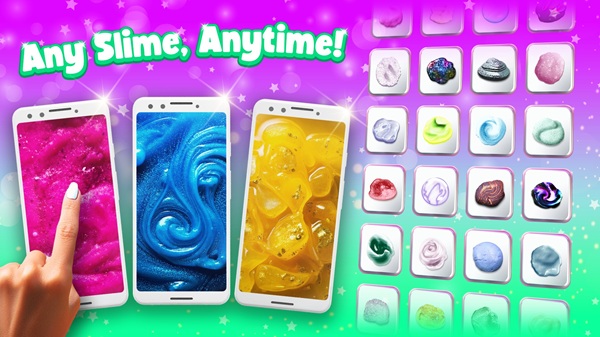
The creation tools are the heart of the experience and offer enough variety to keep things interesting. You can start with clear slime, metallic gloss, jiggly blends, milky smooth bases, or other textures. Each one moves differently and reacts in its own style once you start shaping it.
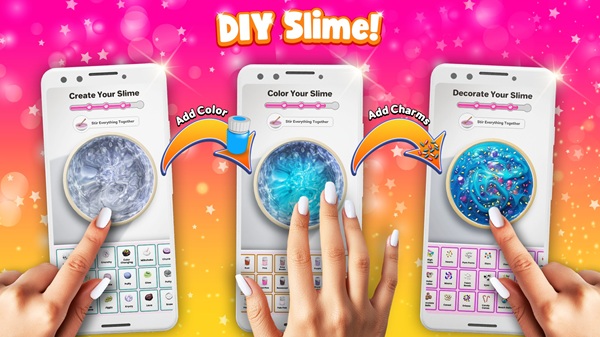
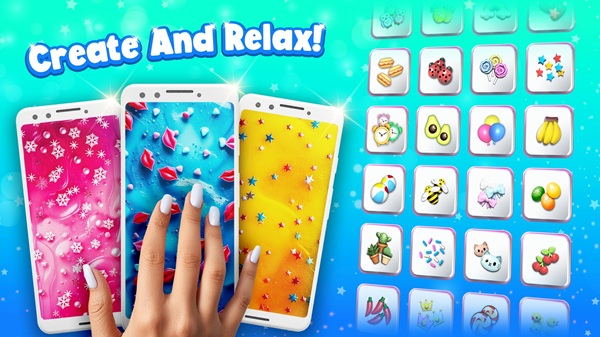
The personalization steps are laid out so anyone can follow them easily. First, you pick a base texture. Then you add color, mix shades, drop in decorations, and give your slime a name once it’s done. Decorations range from glitter and gummy-style cubes to cute themed figures. These elements aren’t just visual; they shift the way the slime sounds and reacts when tapped or stretched. That variety makes the app popular among users who enjoy crafting and prefer having something they can tailor to their taste.
Sensory Elements and ASMR Benefits
Sound design is a huge part of what makes Super Slime Simulator feel so satisfying. Each slime texture comes with its own audio vibe, whether it's gentle pops from trapped air, smooth stretches from softer blends, or sharp taps from thicker putty-like styles. The sounds match every swipe and poke you make, creating a responsive feel even though it's all happening on a touchscreen.
A lot of players enjoy apps that focus on sound and movement because they help create a calmer headspace. This type of sensory play is often used for relaxing after school, staying grounded during stressful moments, or simply passing time with something soothing. Since each texture reacts differently, the audio feedback shifts too, giving users tiny variations that keep the interactions from feeling repetitive. It’s a simple concept, but it fits naturally into everyday routines for anyone who likes low-effort ways to unwind.
Game Modes and Extra Activities
The app includes a couple of playful side modes that go beyond basic slime crafting. Lu-lu’s Slime Quest adds small challenges where you follow tasks or complete objectives to earn rewards. Guess the Slime gives you a mystery slime to identify based on its look or sound. These modes aren’t overly complicated, but they add enough variety to give the app a little more replay value.
Another neat touch in Super Slime Simulator is the ability to share your customized slime as a digital gift. Friends can tap into it, stretch it around, and see the name or decorations you added. It’s a simple way to make the app feel a bit more social without needing constant online activity.
User Experience and Accessibility
The layout is clean, colorful, and designed so beginners won’t get confused. Buttons are spaced nicely, and menus are simple to tap through. This makes the app approachable for younger kids while still being smooth enough for older players who just want an easy design tool. Performance generally feels stable on most modern devices, and the controls respond quickly to touch movements.
Different age groups interact with the app in their own way. Kids often focus on bright colors and decorations, teens tend to experiment with textures or mini-games, and adults lean toward the sensory relaxation aspect. Since everything is virtual, parents appreciate that kids can play with slime without getting glue or glitter all over the house.
Advantages and Things to Consider
The strongest points of Super Slime Simulator lie in its large selection of textures, flexible customization tools, relaxing sound effects, and easy-to-use controls. It feels approachable for kids while still giving older players a chill break from fast-paced games. Its tactile-style animation adds a playful edge that real slime can’t offer, especially when it comes to variety, creativity, and staying mess-free.
There are a few things users may want to consider. Some decorations or textures require in-app purchases. Storage use varies depending on device, and certain online features may need a connection. These aren’t dealbreakers, but it’s helpful to know them ahead of time so expectations stay realistic. User feedback highlights that the app works best for light entertainment and sensory play rather than long sessions, which helps readers understand whether it suits their daily habits.
Conclusion
Super Slime Simulator blends creativity, sensory interaction, and simple game modes into a calming and customizable experience. It works well for anyone who enjoys crafting, kids who like colorful textures, or users who want a soft, low-stress moment during the day. The blend of sound reactions, tactile motion, and personalization tools gives the game its charm and keeps it fun without feeling overwhelming.
If you want to try it for yourself, you can download the Super Slime Simulator APK safely from APKJaka to get the official installation file and start crafting your own virtual creations.
Frequently Asked Questions Super Slime Simulator
-
What is Super Slime Simulator?
Super Slime Simulator is a creative slime-making game where you stretch, poke, color, and customize virtual slime with realistic motion and sound. -
What is Super Slime Simulator APK?
Super Slime Simulator APK is the official installation file for Android devices, letting you install the game manually when needed. -
Is Super Slime Simulator free to play?
Yes, the game is free on Android. Some textures or decorations may require optional in-app purchases, but the core gameplay works without spending. -
Is Super Slime Simulator safe for kids?
It’s kid-friendly, since the gameplay is simple, sensory-based, and mess-free. Parents often like it because it avoids real-slime cleanups. -
Why do people like Super Slime Simulator?
The mix of soothing sounds, smooth textures, and tons of customization gives players a quick break from high-energy games and daily stress. -
What is Super Slime Simulator?
Super Slime Simulator is a creative slime-making game where you stretch, poke, color, and customize virtual slime with realistic motion and sound. -
What is Super Slime Simulator APK?
Super Slime Simulator APK is the official installation file for Android devices, letting you install the game manually when needed. -
Is Super Slime Simulator free to play?
Yes, the game is free on Android. Some textures or decorations may require optional in-app purchases, but the core gameplay works without spending. -
Is Super Slime Simulator safe for kids?
It’s kid-friendly, since the gameplay is simple, sensory-based, and mess-free. Parents often like it because it avoids real-slime cleanups. -
Why do people like Super Slime Simulator?
The mix of soothing sounds, smooth textures, and tons of customization gives players a quick break from high-energy games and daily stress.