
Game Turbo Xiaomi
Game Turbo Xiaomi is a utility tool built to steady game performance by tuning device activity, limiting interruptions, and giving quick controls that help players keep their focus during matches.
screenshot
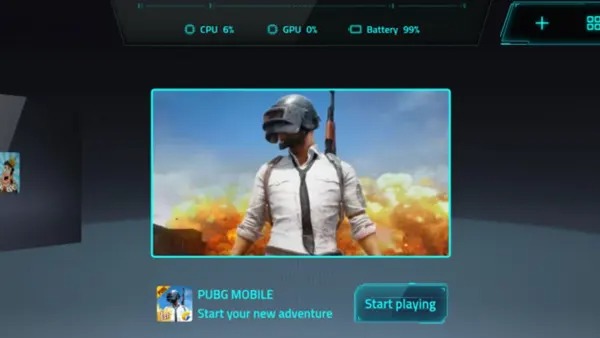
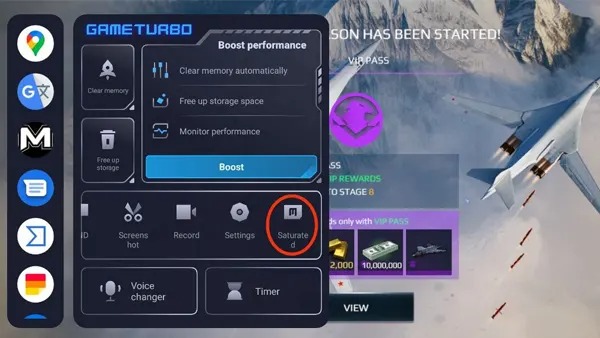


Information of Game Turbo Xiaomi

Introduction to Game Turbo Xiaomi APK
Game Turbo Xiaomi APK is the installation file used to set up the this app on supported devices, giving users access to a tool Xiaomi created to improve how games run on its phones. The app itself acts as a system-level companion for players who want smoother sessions, better focus, and more control over the performance of their device. It handles resource distribution in the background, steadies frame output, and cuts down on interruptions that usually get in the way of gameplay. In this article, each section will walk through the app's purpose, the features players rely on, and the benefits that come from using it day-to-day.
The tool is designed to help users keep their games running without unnecessary slowdowns by managing system activity and reducing disruptive alerts. Xiaomi built it as part of its broader software ecosystem, so it works naturally with supported phones and doesn’t require complicated setup. Think of it as a performance assistant built for quick reactions, simple tweaks, and consistent results. With that in mind, the next sections break down how it helps, when it’s useful, and what players can expect once they add it to their routine.
How the Tool Supports Daily Gaming Needs
Players often deal with sudden drops in frame output, unexpected lag, or apps running in the background that drain memory. Tools like this step in by smoothing those fluctuations so gameplay feels more predictable. When this app is active, the system prioritizes the current game, making quick decisions about which tasks to slow down and which actions to suspend temporarily. This helps create a more stable session, especially during scenes that normally cause slowdowns.
Another perk comes from the built-in shortcuts in Game Turbo Xiaomi. Instead of jumping between apps or digging through menus, players can pull up small tools right on top of their game. If constant messages start pulling attention away, the tool offers a quick way to mute alerts without leaving the match. And when a session runs long and the device begins to feel heavy, the memory-clearing shortcut sits ready for a quick reset. These small touches make a big difference during high-pressure moments, where even a single second can change the result.
Real-life examples are everywhere. Multiplayer shooters, racing titles, or strategy games demand stable touch response and clean frame pacing. With the tool working behind the scenes, heavy scenes feel less chaotic and players can stay locked in from start to finish. It’s small tweaks like these that make everyday gaming feel easier and more consistent.
Core Functions That Shape Gameplay Stability
The stability features are where the tool really proves its worth. It adjusts how resources such as CPU and memory are used, helping prevent sudden spikes that normally slow down games. Instead of letting apps compete for attention, the system gives priority to the current session so the player gets a smoother experience.
The FPS panel is one function many players appreciate. It gives real-time insight into how the game is performing so users can see when the device is under pressure. Touch response tuning is another practical tool because it affects how quickly the device reacts to finger inputs, which makes a noticeable difference in fast games. Network management also helps reduce delays by analyzing small fluctuations in connection strength.
Users can tweak a variety of settings in this app based on their device and the way they like to play. Someone who enjoys racing titles may prefer more responsive touch controls, while players who focus on strategy games often lean toward stable FPS for smoother planning. These adjustments are simple to apply and don’t require technical skills, making Game Turbo Xiaomi easy for anyone to use.
Convenience Tools Built Into the Sidebar Panel
The floating sidebar is one of the more recognizable features because it appears instantly when players swipe from the edge. It acts as a quick-access panel with shortcuts users typically need while gaming. The idea is simple: everything you might want is available without leaving the game.
Inside this panel, users can find tools like screen recording for saving gameplay moments, memory clearing for freeing up resources, brightness control, a timer for tracking session length, and a lightweight messaging window that doesn’t cover the whole screen. These tools help players stay organized without breaking their flow.
Because everything is grouped in one place, interruptions are kept to a minimum. Instead of pausing the game or navigating back to the home screen, players tap once and get the feature they need. The sidebar also helps users track performance, check FPS, or quickly make adjustments when something feels off.
Why Mobile Players Appreciate Its Focus Features
Game Turbo Xiaomi is helpful for players who get annoyed by pop-ups, mis-taps on system buttons, or random notifications that show up in the middle of a match. It keeps distractions under control by managing alerts, blocking accidental touches, and keeping the entire session steady and focused.
Competitive gamers especially value this because even minor interruptions can affect the outcome of fast matches. Casual players benefit too, since fewer distractions make long sessions feel more relaxing and immersive. Many community discussions mention how having one place to manage interruptions makes the gaming experience feel more controlled.
These features also help players who switch between long and short sessions. Whether someone is playing a quick round during a break or diving into a longer campaign, the session feels smoother when interruptions are kept away.
Tips for Getting Better Results With Game Turbo Xiaomi
Adjusting Settings for Performance
Before launching a game, players can review the available settings and enable options that fit their device. Clearing background apps frees up memory and reduces strain. Enabling focus features keeps random alerts from breaking concentration. These small habits help the device use its power more effectively.
Making the Most of Its Tools
Game Turbo Xiaomi makes the overlay feel way more useful when you try it during real matches, letting players track FPS drops in busy moments, tweak brightness as scenes change, and save short clips for review. These tools are built for hands-on use, and experimenting with them helps each session feel more personalized.
Pros and Limitations Worth Knowing
The tool offers plenty of strengths. Smoother play, a helpful sidebar, alert control, and tools that keep everything within reach are among the most appreciated features. It gives users a simple way to keep their phone focused on the game instead of juggling many tasks at once.
There are limitations worth noting. Not every phone supports every feature, and performance can vary depending on the model. Some users may prefer deeper control options that aren’t available in the app. These points don’t take away from its usefulness but help set realistic expectations.
A balanced view helps readers decide whether the tool matches their personal gaming habits.
Conclusion
Game Turbo Xiaomi supports mobile players by offering stability tools, quick-access controls, and options that reduce distractions during gameplay. It’s especially helpful for users who want consistent performance and a smoother experience across different types of games. Anyone looking to streamline their sessions or manage system behavior more easily will find the tool helpful.
If you want to try it yourself, you can download the Game Turbo Xiaomi APK safely from APKJaka and start using the official installation file on your device.
Frequently Asked Questions Game Turbo Xiaomi
-
What is Game Turbo Xiaomi?
Game Turbo Xiaomi is a system tool on Xiaomi devices that boosts gaming stability, improves responsiveness, and keeps distractions out of your way. -
What does Game Turbo Xiaomi APK do?
The APK lets you install the tool on supported Android devices, giving access to features like performance tuning, touch controls, and a quick-access gaming panel. -
Is Game Turbo Xiaomi safe to use?
Yes—when downloaded from trusted sources, it’s safe and works within Xiaomi’s system environment without requiring risky changes to your device. -
Why do gamers use Game Turbo Xiaomi?
Players use it to smooth out gameplay, manage FPS, reduce lag, and access shortcuts like screen recording or memory clearing without leaving their match. -
Can non-Xiaomi phones use Game Turbo Xiaomi?
Some Android phones can install the APK, but features may vary since the tool is built primarily for Xiaomi’s software ecosystem.