Blackmagic Camera
Blackmagic Camera is a professional filmmaking app that transforms your phone into a digital film camera, letting you control ISO, shutter angle, and white balance to produce cinematic videos with precision.
Screenshot


Information from Blackmagic Camera
Introduction to Blackmagic Camera APK
Blackmagic Camera APK is the installation file for a professional-grade photography app for Android designed to give smartphone users the same creative control as digital film cameras. Developed by Blackmagic Design Inc., a brand trusted in cinema technology, the app lets users fine-tune ISO, shutter angle, frame rate, and color balance — all directly from their phones. It’s made for filmmakers, vloggers, and creators who want cinematic-quality results without carrying heavy camera gear.
The app’s purpose is simple: make high-quality video production accessible to everyone. Whether you’re shooting a short film or content for social platforms, Blackmagic Camera gives you control that native camera apps simply can’t match. Let’s go through how it works, its key features, and why it’s become a favorite among creators aiming for professional results.
Core Idea Behind Blackmagic Camera
The main idea behind it is to merge mobile convenience with the power of professional filmmaking tools. It’s designed to mimic the interface and workflow of the company’s cinema cameras, giving users the same smooth controls and high-end shooting flexibility. For creators who want their videos to look cinematic without investing in heavy camera rigs, this app is a practical game-changer.
Unlike most smartphone camera apps that rely on auto, this one focuses on manual precision. You can control everything — from exposure to frame rate — and shoot in professional formats ready for editing in DaVinci Resolve. It’s a perfect bridge between everyday shooting and advanced production work.
Key Features That Define the App
Manual Control Tools
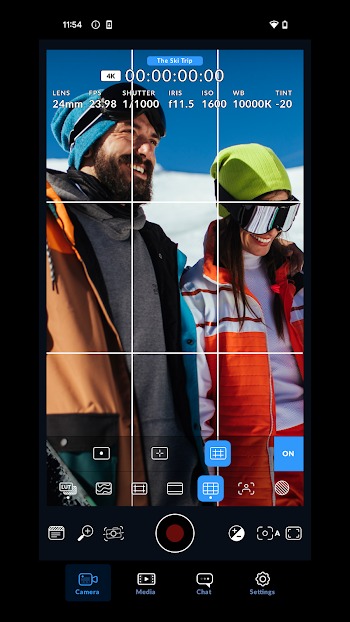
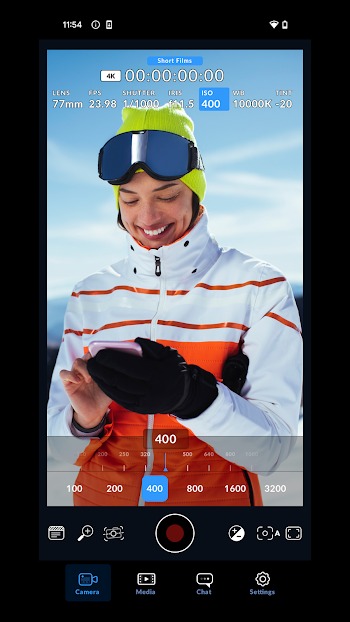
One of the biggest strengths of Blackmagic Camera is its manual adjustment system. Users can fine-tune ISO, white balance, and shutter speed to match lighting conditions or achieve a specific visual tone. It even supports shooting in resolutions up to 8K, ensuring your footage remains crisp and detailed.
Cinematic Interface Design
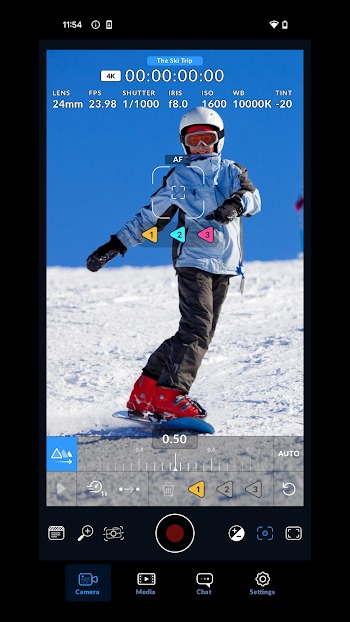
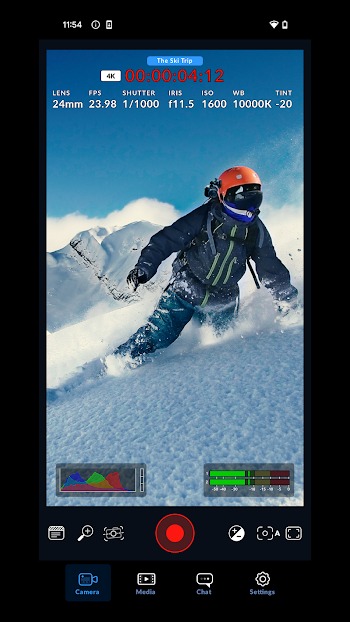
The interface feels like using an actual digital film camera, yet it’s designed for quick access and ease of use. With just one tap, you can change key settings, review your footage, or adjust frame rates. The intuitive layout makes it easy to work efficiently during fast-paced shoots.
Cloud Recording and Collaboration
One of the standout features is its integration with Blackmagic Cloud. Users can record videos directly to the cloud, making it effortless to share and edit projects remotely. Editors working in DaVinci Resolve can collaborate in real-time, a massive advantage for production teams working across different locations.
Built-In Video Editor
You don’t need to export your videos to another app to make quick edits. Blackmagic Camera includes a built-in editor for trimming, cutting, and rearranging clips. You can export them in various formats — whether you’re uploading to YouTube, posting to Instagram, or preparing a professional presentation.
How Blackmagic Camera Improves Mobile Filmmaking
This app transforms your smartphone into a full-fledged digital film camera. By giving users manual control over exposure and frame rate, it allows consistency across different shots — something that’s critical in filmmaking. You can adjust your settings for specific moods or lighting conditions, giving you total creative control.
Compared to standard phone cameras, the results are noticeably sharper and more cinematic. Shadows, highlights, and colors feel balanced and natural. This makes it especially useful for vloggers, indie creators, and content producers who need professional-quality footage on the go without investing in extra equipment.
Real-World Uses and Creative Benefits
Blackmagic Camera has become a tool of choice for creators producing everything from short films to branded content. Influencers use it to maintain consistent quality across social media platforms, while small studios rely on it for agile production. Its ability to handle various lenses and simulate framing options makes it flexible for different storytelling needs.
Here are a few quick creative tips for getting the most out of the app:
- Experiment with manual focus to control depth of field.
- Match white balance to your lighting setup for accurate color tones.
- Adjust frame rate for slow-motion or cinematic effects.
Pros and Cons of Blackmagic Camera Android
Advantages
- Offers complete manual control and supports ultra-high resolution recording.
- Syncs easily with Blackmagic Cloud and DaVinci Resolve for editing and collaboration.
- Produces accurate colors and natural contrast for a true cinematic aesthetic.
Limitations
- Some advanced features may vary depending on the device.
- Beginners may need time to get comfortable with manual camera settings.
Why Creators Trust Blackmagic Design
Blackmagic Design has built its reputation in the professional film industry through years of innovation in camera systems, switchers, and post-production software. Their products are widely used in Hollywood films and independent projects alike. The same design philosophy applies to the Blackmagic Camera app — reliability, precision, and real creative control.
This strong foundation of expertise gives users confidence that the app isn’t just another mobile tool but a genuine extension of professional-grade filmmaking. Regular updates, responsive design, and compatibility with Blackmagic’s ecosystem make it a long-term choice for creators who want dependable results.
Conclusion
Blackmagic Camera turns smartphones into powerful filmmaking devices, letting creators control every visual detail with accuracy. From 8K recording to live cloud collaboration, it’s built to support both solo content creators and production teams. The app’s intuitive interface and professional tools redefine what mobile videography can achieve.
Whether you’re filming short movies, travel vlogs, or creative projects, this app gives you the same level of control and finish as a studio camera — right from your pocket. To start capturing cinematic videos safely and professionally, visit the website APKJaka to download the official Blackmagic Camera APK and take your content to the next level, frame by frame.
FAQs
What is Blackmagic Camera?
Blackmagic Camera is a pro filmmaking app that turns your Android phone into a digital film camera, giving you manual control over ISO, shutter speed, and color balance.What does Blackmagic Camera APK do?
The APK installs the Blackmagic Camera app, letting you shoot cinematic videos in high resolution, adjust advanced settings, and collaborate through Blackmagic Cloud.Is Blackmagic Camera free to use?
Yes, it’s free to download and use on Android. Some features may vary depending on your device’s camera hardware and software compatibility.Can I edit videos inside Blackmagic Camera?
Absolutely. The app includes a built-in editor where you can trim, arrange, and export clips directly without switching to another editing tool.Is Blackmagic Camera safe to install?
Yes, as long as you download the official Blackmagic Camera APK from trusted sources like APKJaka or Google Play.